Monday, June 22, 2009
Saturday, June 20, 2009
Intelligent Data Management Framework for Microsoft Dynamics AX
At RTM, this Framework will include “Archive to Offline” Instance Support.
Labels: General
Thursday, May 21, 2009
Inside Microsoft Dynamics AX 2009 has RTM'ed today :-)
The 2nd book from Microsoft Press on Microsoft Dynamics AX has RTM'ed today and is available on Amazon to preorder. As per sources, this book will be available from June 10th onwards. I had a small involvement in this book and I recommend this to all AX 2009 developers. This is a must read if you want to get your fundamentals cleared. Lots of detailed information on AX 2009 Architecture, EP & Role centre, Workflows, AIF, Performance and so on. Click on the image below to preorder. 
Labels: General
Wednesday, May 6, 2009
AX 2009 & Office Business Applications [OBA]
A small example of Dynamics AX 2009 , OBA, .NET BC & Web Services (AIF). I found this OBA thing pretty interesting and did a simple demo which enables a developer to use VSTO to customize Excel which connects to AX 2009 using 2 ways (.NET BC & AIF WS) and retreives the customer list and populates the excel sheet.
A very simple example with great potential. Basically the demo consists of customizing the Ribbon in Excel 2007, adding buttons which fetches the customer master from AX 2009 using .NET BC & AIF WS. The sample code (VS 2008) is also uploaded. You can download this and customize it. I have used the base AX CustomerService Service as a sample WS. You need to change the Web Reference in the project file.
The sample project file is uploaded below.
Happy DAX-ing :)
Labels: How To's
Saturday, February 21, 2009
AX Application Launcher
I have often seen that it becomes difficult to manage AX Configurations in an implementation. Considering the fact that one has multiple instances in any implementation like Development, test, UAT, Pre Production, Production, Training and DR, it becomes quite confusing to centrally manage these and at the same time distribute these to end users. Also asking end users to manually select configurations sometimes becomes quite confusing to end users. Moreover deploying .axc and .url files to all end users becomes quite a pain :-(. To relieve this pain in one of my implementations, I came up with an AX Launcher which can be installed on each users machine . It creates 2 local folders , one for .axc files and other for .url files . This launcher then shows all the files in groups to the user. These 2 folders can now be remotely updated/ synched by the admin so when new configurations are available, it is dropped into these folders and end users can access them. Also when existing configurations are no longer used, they can be remotely removed from the folders :)
The Application looks like this...
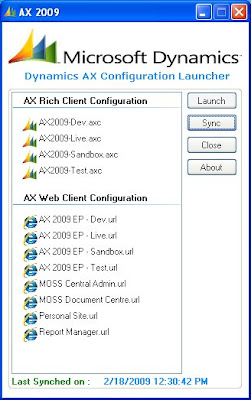
There is an installer which I created which can be installed in users PC/Laptops (I tried with WIN XP and WIN 2K3).
You need .NET 3.0 framework to install this. The Installer created 1 root folder "AXConfig" in C:\ of the users PC and inside that folder creates 2 folders "AXRichClient" and "AXWebClient". You need to have Admin privilidges to install this. In the "AXRichClient", drop some .axc files and in the "AXWebClient" drop in the EP shortcut files - .url". The application is set to autosync with this folder every 10 mins. However the sync can also be done manually. I have attached the video on how to install the files and how to use it.
For testing purposes, I have uploaded the installer files [LauncherSetup.msi & setup.exe] as well as the video file. Please see the video file before installing. In case you want to try it out, please download these 2 files into the same folder and run setup.exe. Please do this in a test environment :). In case of any bugs, let me know.
Happy DAX-ing :)
Labels: How To's
Friday, February 13, 2009
Managing Your Supply Chain using Microsoft Dynamics AX 2009
Scott Hamilton has released his book on AX 2009 SCM. Like his previous title, this edition for AX 2009 is a must read for all AX SCM Consultants who are implementing AX 2009. "Managing Your Supply Chain addresses the need for an overall understanding about using Microsoft Dynamics AX to manage manufacturing and distribution businesses. The targeted reader includes those individuals implementing or considering Dynamics AX as their ERP system as well as those providing sales and implementation services. Firms involved with a system selection process may be considering Dynamics AX as a candidate package, and this book can help reduce selection risks, evaluate system fit and needed customizations, and provide a vision of an integrated system. The book can help businesses involved in implementing and using Dynamics AX by accelerating the learning process, reducing implementation time and costs, and reducing user resistance to change. It suggests changes that can improve system usage and revitalize a wayward implementation. For firms providing sales and services related to Dynamics AX, this book can accelerate the employee learning process for providing knowledgeable customer service in sales, support, and professional assistance. " This book has received very good reviews and is available at Amazon for pre order. Click on the image below to Pre Order your copy.
Labels: General
Tuesday, February 3, 2009
AX goes Green with envi :)
The AX 2009 SP1 Environmental Sustainability dashboard & functionality was released for AX 2009 SP1 on 1st Feb 2009. It is available for download at partnersource and increases the AX dashboard count by 1 :)
The Environmental Sustainability Dashboard and functionality for Microsoft Dynamics AX will help companies understand, many for the first time, what their energy consumption and greenhouse gas emissions are so that they can:
• have greater visibility to environmental costs and potential risks,
• find opportunities for significant cost savings,
• determine a definitive measurement against which reduction goals can be measured,
• make better informed decisions.
The dashboard is shown below:
Click here to download the Dashboard along with related documentation.
Labels: General
Thursday, January 29, 2009
MSDN Ramp Up : Learning

Labels: General
Sunday, January 18, 2009
AX 2009 Document Management & MOSS / WSS
The first step was to create a MOSS Site (Document Centre template - MOSS 2007 SP1). Now I needed to store documents of various AX Modules so I created subsites for the different AX modules like CRM, Projects etc. Then the next step was to create a document library, add some extra columns to store metadata from AX (I created columns for RecId, Company, Remarks). Then save this docu library as a template for reusability :-).
Then I created a C# Class library which accepts parameters and uploads the document to a specified URL, Site & Document Library and returns the URL of the attached document. See code snippet below:
======================================================
using System;
using System.Collections.Generic;
using System.Linq;
using System.Text;
using System.Web;
using System.IO;
using System.Net;
using Microsoft.SharePoint;
using System.Collections;
namespace DynamicsAX2009
{
public class MOSSDocumentManagement
{
public String uploadDocument(String _URL,
String _Site,
String _Library,
String _File,
String _AXID,
String _AXCompany,
String _AXRECID,
String _AXReference)
{
String sUser = "mossadmin";
String sPwd = "H@lloom24";
String sDomain = "MVP";
System.Net.NetworkCredential NC = new System.Net.NetworkCredential(sUser, sPwd, sDomain);
try
{
string SiteURL = _URL + _Site ;// "http://arijit:150/AXCRM";
String Library;
SPSite sp = new SPSite(SiteURL);
SPWeb site = sp.OpenWeb();
Library = _Library;
SPFolder folder = site.GetFolder(Library);//Case Studies ; Solution Brief
SPFileCollection files = folder.Files;
FileStream fStream = File.OpenRead(_File); //path of the file to upload
byte[] contents = new byte[fStream.Length];
fStream.Read(contents, 0, (int)fStream.Length);
fStream.Close();
Hashtable MetaDataTable = new Hashtable();
MetaDataTable.Add("AX-ID", _AXID);
MetaDataTable.Add("AX-Company", _AXCompany);
MetaDataTable.Add("AX-RECID", _AXRECID);
MetaDataTable.Add("AX-Reference", _AXReference);
_File = _File.Substring(_File.LastIndexOf("\\") + 1);
SPFile currentFile = files.Add(_File, contents, MetaDataTable, true);
if (currentFile.CheckOutStatus != SPFile.SPCheckOutStatus.None)
{
currentFile.CheckIn("New Version from AX");
}
return SiteURL + "/" + currentFile.ToString();
}
catch (Exception err)
{
return ("
}
}
}
}
======================================================
Labels: How To's
Saturday, January 17, 2009
AX 2009 :Cubes & Security Documentation
I was kind of very busy with an AX 2009 SP1 GDL Cons Implementation and really had some tough time configuring the cubes when country configuration keys were switched off :(. Well I gathered some nice documents regarding this . Click on the link below to download these.
Happy DAX-ing :)
Labels: How To's