WINDOWS Live Search

To contact me for any clarifications regarding any posts / information, please mail me at arijit [dot] basu [at] gmail [dot] com


Friday, August 8, 2008

Rapid Configuration Tool for Dynamics AX 2009

The new release of Rapid Configuration Tool (RCT) for Dynamics AX2009 is now available for download at Partner Source.

The Rapid Configuration Tool is integrated into Microsoft Dynamics® AX and provides key assistance to partners and customers during implementation by providing project management features, easier configuration access, communication support and documentation on how to successfully configure Microsoft Dynamics® AX.


Click here to download [Requires Partnersource Access]

Thursday, July 31, 2008

Microsoft Dynamics AX 2009 White Paper: Posting to the Ledger

Hi, Came across a very nice resource for Posting to AX Ledger via API's. Really nice and must read.


Happy DAX-ing :)

Tuesday, July 8, 2008

Demo Data for Microsoft Dynamics AX 2009

The demo data for Dynamics AX 2009 has been released. Its "Contoso Entertainment Systems (CES)" . Now the Demo data comes in 2 flavours... standard dat/def & a SQL backup. Click the link below to download.


Demo Data for Microsoft Dynamics AX 2009 [Requires Partnersource Logon]

Saturday, June 28, 2008

“How Do I” Videos — Dynamics AX

The Dynamics AX 2009 EP has undergone some major changes. Couple of “How Do I” Videos have been uploaded at MSDN by Mey and his team. Its a must download.
“How Do I” Videos — Dynamics AX
Also check out the AX EP team BLOG
AX EP Team BLOG
Check it out during the weekend :)

Wednesday, June 18, 2008

AX 2009 Workflows: A Quick overview

Here is a quick overview on AX 2009 Workflow...a feature long awaited :)
Workflow - "Machine readible code for a business process"
-Feature of Base AX 2009

-Workflow components reside on a Web Server
-Utilizes the Windows orkflow Foundation (.NET 3.0)
-Utilizes the AX Batch framework
-Requires AD User for Workflow
-Requires exclusive site on IIS to function
-The Workflow components on the Web server use the .NET BC to communicate with the AOS using Workflow system account(existing AX user).
Architecture overview:-

Setup (Steps):-
-Setup AD User for Workflow Account & configure in AX

-Setup & Configure IIS on Web Server

-Setup Workflow Component using AX installation option
-Run the Workflow Infrastructure Configuration Wizard {Batch Jobs, Workflow site}
-Configure the Workflow in AX
Workflow Objects:
Workflow templates:
Workflow templates capture information about workflow categories , what business document the workflow will operate over, what workflow elements (Tasks and Approvals) are required in the workflow configuration,which application event handlers will handle the events that are raised as the workflow executes etc.The first step in creating a workflow is to add a workflow Template. A Workflow Template can be said to be the metadata A workflow template provides information on:
• Which workflow document to use.
• Tasks and approvals that can be configured by the user.
• Workflow categories used for assigning a workflow template to a specific module.
Workflow category:
The workflow category determines whether a workflow template is available in a specific module. After a workflow
category is created, it is possible bind the workflow category to a workflow template.


Workflow Configuration:
A Workflow Configuration is bound to a single Workflow Template, and there can be multiple Workflow Configurations
for the same Workflow Template. Only a single Workflow Configuration for each WorkflowTemplate can be the default WorkflowConfiguration. The Workflow Configuration captures what tasks will be executed, who the tasks are assigned
to.
Workflow Query:
Dynamics AX workflow uses a query to set up conditions for a workflow. The query identifies which data is available to workflow users. Queries are bound to Workflow templates. Once the query is created, a Workflow class needs to be created which contains the query name & any calculated fields.
Workflow Tasks:
AX workflow tasks are used to track documents or tasks from the start to the end of a work process. A workflow may
contain one or many tasks. Each task contain one step.

Workflow Approvals:
Workflow Approvals are used to track ststus of Workflow documents . The fixed outcomes are ‘Approve’, ‘Reject’, or
‘Request Change’.
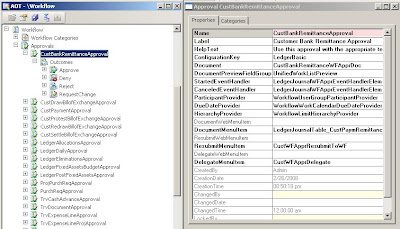
After you create a task, approval, or outcome in a AX workflow, it must be added to a menu item. The end-user can then start the task or approval using the menu item as a part of the workflow process.
Workflow can be activated throughout the various lifecycle stages of a business document: Create, Update, Delete, Post. The Workflow runtime will execute the Workflow and assign Tasks to users. Users interact with theWorkflow through Alerts/Workflow Tasks, from where they can take action (Approve, Reject) or they can navigate to the business document and view all details before taking the workflow action.
Apart from these basic concepts, there are concepts like Implement Providers, Event Handlers which I will explain in a later post.

Saturday, June 14, 2008

Using AX .NET BC to create Purchase Orders

A small but nice project to create multiline Purchase Orders in AX from a .NET Windows application. In this small POC, there is a Windows Application (C#) which uses the .NET BC to create PO into AX. Its a simple demo but can be extended to other areas like journals, Sales Orders , Inventory Transactions (any multiline header - detail type). For this a small class is written inside AX which exposes the logic. I have used the AXPurchTable() & AXPurchLine() classes to enter PO in AX. There is a similar post in MSDN (Using Axapta Business Connector to Create Microsoft Business Solutions–Axapta Sales Orders) but that uses the COM Connector & consists only of a single line. This sample can support multiline PO :). I have not worked too much on the validations & other advanced areas. The C# code also may not be the best :) but its simple.

The video on how to use it is attached below [Assumes that the current logged in user has User rights to AX]


I have also uploaded all source files in the link below. To run the exe, you must import the xpo inside AX. I have used AX 4.02 to make this demo.


Let me know if anyone has a better way of doing this.
Happy DAXING :)

Friday, May 23, 2008

AX 2009 Release

AX 2009 is now RTM (Release To Manufacturing). Please check link at Partnersource to download.The Microsoft Dynamics AX 2009 download is a full install and required for new installations or upgrades from previous versions. Microsoft Dynamics AX 2009 supports upgrades from Microsoft Dynamics AX 3.0 Service Pack 4 (or higher) or Microsoft Dynamics AX 4.0 Service Pack 1 (or higher).

Download AX 2009 [Requires Authentication]

Monday, May 19, 2008

A preview of Dynamics AX 2009 with the Dynamics team

A new video is published on Channel 9. You'll get an overview of the Dynamics systems architecture and see demos of their extensibility layer with Client/Web architecture. Click image to watch video.

Sunday, May 18, 2008

AX 2009 - Quick Overview

Hi everybody, AX 2009 RTM is just closing in. Lots of new features, UX & Enhancements available with the release of AX 2009. Heres a quick preview of some of the important features in AX 2009.
New Company Accounts
Global Trade & Manufacturing Company (GTM) is out. CONTOSO Entertaintment Systems [CES] is IN :). New AX 2009 Company Demo data with more transactions, more data.
User Interface
The AX 2009 User Interface has undergone some serious changes. Initially a bit difficult to navigate if you see it first time but will get used to it. Breadcrumb bar, Travel Buttons, Address Bar, Enhanced Navigation Area, Area page and List pages include some major changes in UI. Looks good ....performance figures awaited :).


Role Centres
Role centres are a collection of customizable home pages . Role Centers display specific data, reports, alerts, and common tasks associated with a user's role in the organization. Users can access Role Centers from the Microsoft Dynamics AX 2009 client or from an EP Web site. Uses the EP Framework & Webparts. Base AX consists of 25 canned role centres . Other Roles can be customized. Gives a very good overview to key people in the Organization about key top level data. Included Excel Pivot charts, Graphs and a nice UI.


Workflows
Much awaited & most wanted feature in AX has finally arrived out of the box. Features a new Node in AOT named 'Workflow'. Users can configure workflows, create templates, define rules & escalation logic. New Workflows can be developed. Available as a base Product feature and mighty useful. {Workflow Templates-> Workflow Configuration -> Workflow Instance} . Uses WWF & Workflow Web Services in the IIS. Runs in the IIS Server in a separate site and connects to AOS via .NET BC. Uses the Batch framework.

Multisite operations
New AX Inventory Storage dimension called 'Site'. One site may contain multiple warehouses. Advanced SCM features like costing available in Site dimension.

Multi time zone support
AX 2009 AOS installation can meet the business needs of a company that has operations across multiple time zones including adjustments for Daylight Savings Time (DST). All date/timevalues are stored in Coordinated Universal Time (UTC). AX 2009 application is able to display the date time fields in the appropriate time zone, depending on either the client settings or on the time zone of the location. Critical feature for companies operating in different geaogaphies.
Expense Management module
New AX Expanse management module for Employee. Available in EP allowing employees to create and manage expenses, incorporates workflows. Important piece in ESS.
Improved SCM enhancements
New SCM features lite Multisite, Purchase Requisition, 3 Way Matching are some of the new features in AX 2009.

Project Server integration
At last, AX Projects integration with MS Project Server 2007. Bidirectional features but basic level integration. The feature list is building up. Allows remote management of AX Projects via MS Project Server 2007.

Enhanced EP Framework
Personally my favourite. The EP in AX 2009 has undergone serious surgery :) and has great new features, new Development platform (VS 2008) and significant enhancements. [AJAX enabled for rich UX].
The following enhancements have been made to the Enterprise Portal userinterface:
• More interactive and responsive through the use of AJAX in the Web pages.
• Individual pages are refreshed when you click a link.
• Actions can now be done on selected list items. You can see listpreviews, and lists can be sorted, filtered, and grouped. Also, the listviews can be changed.
• Accessing all Enterprise Portal pages is now consistent.
• Multiple companies can be accessed through Enterprise Portal.
The Development environment is VS 2008. Now ASP.NET components include AX Objects like AXGridControl, AX Infolog Control etc. Makes development in ASP.NET with AX components much easier. Scenarios where company website needed to be interfaced with AX has just got easier. Job Postings, Recruitment drives, Resume submissions, Customer/ Vendor interface can now be done much easily with these enhanced features.
Enhanced features in AX Modules include:
--Expense Management
--Returns Management
--Purchase Requisition
--Customer Relations Management (CRM)
--Service Management
--Access to Multiple Companies
--Compliance centre
--Role Centres


Enhanced AIF Framework
Enhancements to Application Integration Framework (AIF) include the following:
• Create, read, update, and delete operations are now supported.
• The programming model for AIF supports document services that encapsulate business logic and are the interface between AX 2009 and external systems.
• AIF provides functionality for consuming external Web services from within X++.
• New document services for additional commonly-used documents.
Ugrade Enhancements
Enhancements have been incorporated in the AX Upgrade toolkit. Upgrade estimation report shows the time required for the Code upgrade by identifying conflicts like Code Conflict, Layering conflict, Deletion conflict etc and associating a time estimate with each. There is also a direct upgrade path from AX 3.x to AX 2009
New Partner Productivity tools
New Partner Productivity tools like task Recorder helps create user manuals, Help manuals within AX easily. More add on Productivity tools on the anvil.

AX forms opens up outside AX Window
A new feature in AX 2009 UX is that all new AX forms open outside AX Window anabling users to utilize full Screen. Each form has toolbar, navigation & filter capabilities.

VS 2008 Web Development Integration
Another interesting dev feature is VS 2008 platform for EP & Web Development. ASP.NET controls include AX. Integrating AX with ASP.NET pages just got easier. Another of my favourites :).


The above list included some major enhancements in AX 2009. Will be detailing more of the above. Happy DAX-ing :)

Sunday, May 4, 2008

Infopath, Web Services & AX Integration

A small quick demo on how to interface Infopath forms with AX using Web Services. In this small simple demo I have created a new supplier registration infopath form which can be posted to the company website. Any supplier
interested in registering can fill up the form and submit it to AX via Web Services. To do this, the following things were required:


1. A class in AX which holds the AX business logic to create new records in VendTable [Class_AXWS.xpo]
2. A Web Service (ASP.net) which invokes this AX class via .net Business Connector
3. A Infopath form which uses this web service [AXVendor.xsn]

First create/ import the class in AX. Then create a Web Service which invokes this class using .net Business Connector. Then create a Infopath form to use this Web Service to interface with AX.


The Web Service which interacts with AX:


The Web Service Code:


The Infopath Form:


Video of the completed application:
Infopath, Web Services & Dynamics AX


Source Code: [Contains all source files & raw video :)]


Happy DAXing:)